
Eight ways to keep your Fabric bill down
We opened our FabCon session, How Much is Fabric?, with a gym analogy. It is January. You make a resolution, join a gym, walk straight to the squat rack and load 300 pounds on the bar for your first rep. Then you head to the bench and put 250 on that.
Nobody trains that way. A lot of teams license Fabric that way.
It does not help that the Fabric trial is an F64. You spend 60 days building on 64 capacity units without paying for any of them, and then the real decision arrives with no sense of what you actually need.
In the first post we shared what we measured: the capacity each way of loading data used, and what a Direct Lake or Import model cost to refresh and view. This post is the other half. These are the choices that keep the bill reasonable once you are running.
1. Start low and work up
Pick the smallest SKU you think could work, run your real loads on it and watch the Capacity Metrics app. Scale up when the numbers tell you to, not before. An F SKU can be resized in a few minutes, in either direction.
Going over is less scary than people expect. Fabric smooths background work over 24 hours, and when a capacity runs hot it slows down and then rejects new work. It does not send you a surprise invoice. The exception is the newer capacity overage option, which keeps things running at a premium rate, so read Microsoft’s documentation and only turn it on deliberately.
2. Keep reports off the capacity until F64 makes sense
Below F64, everyone who views a Power BI report needs a Pro license anyway. That opens up a useful split:
- ETL and storage in a workspace on a small Fabric capacity.
- Semantic models and reports in a Pro workspace, where report queries run on shared capacity and do not touch your Fabric CUs.
Report interactions add up fast, so this one change can keep a team on an F2 or F4 that would otherwise need an F8 or F16.
At F64 and above, viewers with a free license can open reports, and the math flips. Somewhere in the hundreds of report viewers, an F64 starts to cost less than a Pro license for everyone. Where that line falls depends on your region and your agreement, so run the comparison with current numbers from Microsoft’s Fabric pricing and Power BI pricing pages.
3. Use Direct Lake for reporting
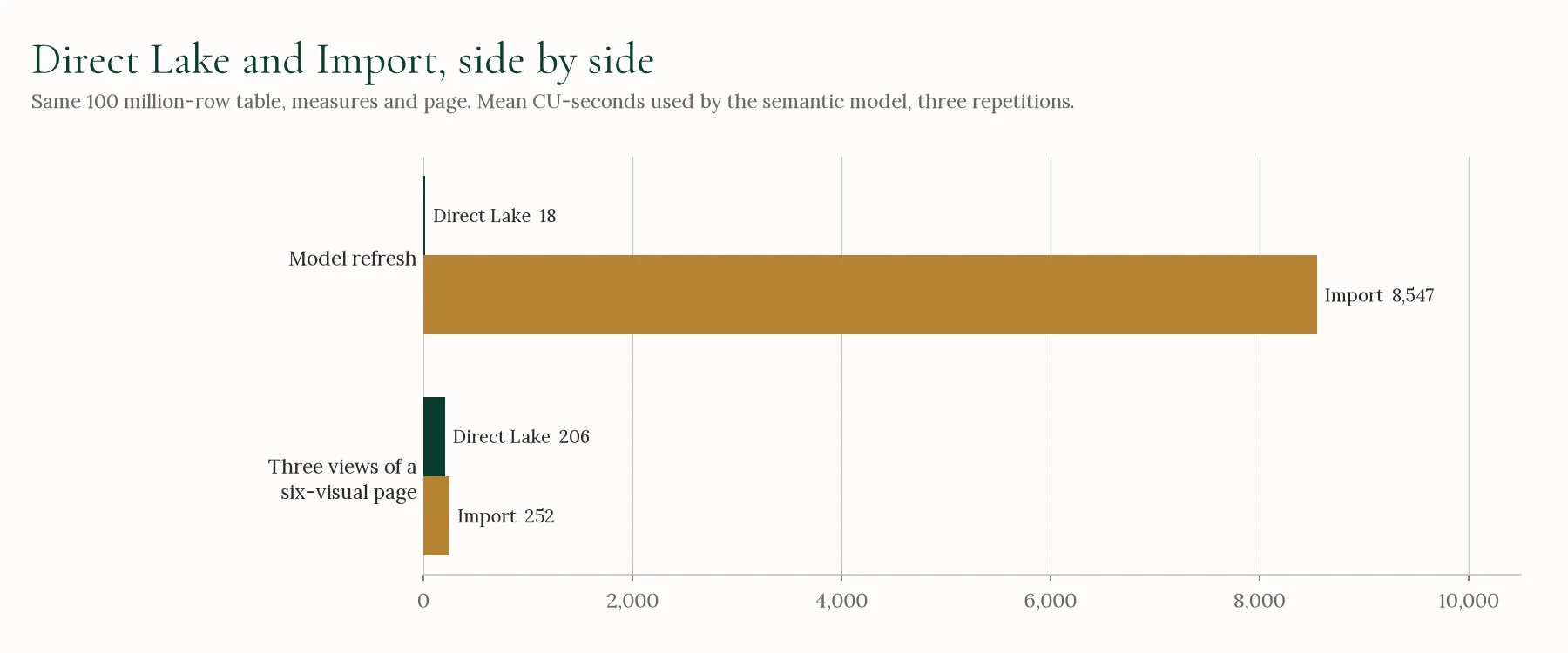
In our tests on a 100 million row table, refreshing an Import model used 8,547 CU-seconds, about 5% of an F2’s day, every time it ran. Refreshing the same model in Direct Lake used 18. Viewing the report cost about the same on either one. If your data already lands in a lakehouse, Direct Lake should be the first option you try, and an Import model that refreshes several times a day is worth a second look.
4. Create the warehouse table before a dataflow loads it
How a Dataflow Gen2 writes to a warehouse depends on whether the table is already there. When the dataflow has to create the table, it inserts the rows 1,000 at a time. When the table exists, it loads them in one statement from its staging area.
In our tests, the same 1 million row dataflow took 716 seconds when it created the table and 54 seconds when the table was already in place. At 10 and 100 million rows, the runs that had to create the table failed after up to 99 minutes, all of it using capacity. Create the table first, with a CREATE TABLE script or a first load of a small sample, and every refresh after that takes the fast path.
5. Reserve once your usage is steady
A reservation costs significantly less than pay-as-you-go for the same SKU (Microsoft’s Fabric pricing page has the current rates for your region). It is the easiest saving in Fabric, but only once you know what size you need. Run pay-as-you-go while you are still learning, then reserve the size you have settled on. If you sometimes need more, you can add pay-as-you-go capacity on top of a reservation for the busy days.
6. Pause what nobody is using
Pay-as-you-go capacities can be paused, and while one is paused you are not billed for it. A dev capacity that only runs during working hours, or a capacity that only does an overnight load, is paying for the rest of the day for nothing.
Pausing and reserving are two different ways to save, and you have to choose: a reservation is billed whether the capacity is running or not. Take the hours a month the capacity actually needs to run, price them at the pay-as-you-go rate, and compare that with the reservation price on Microsoft’s pricing page. A capacity that only runs during working hours often comes out ahead on pay-as-you-go with a schedule.
Two things to know first. Pausing makes everything on that capacity unavailable, so put reporting somewhere else (see number 2). And any smoothed usage still waiting to be billed is charged at the moment you pause. A short Logic App or Azure Automation runbook can resume and pause the capacity on a schedule so nobody has to remember.
7. Turn on surge protection
When reports and data loads share a capacity, one heavy load can slow every report for the rest of the day. Surge protection lets you set a threshold at which the capacity starts turning away new background jobs, so the people opening reports are protected. Those rejected jobs will need a rerun, so treat it as a guard rail and not a substitute for the right size. For workloads that really cannot wait, separate capacities for dev and prod, or for ETL and reporting, do the job better.
8. Watch it every month
Usage drifts. New reports get built, a dataflow gets copied five times, someone leaves a notebook session open. Two tools make it easy to keep an eye on:
- The Fabric Capacity Metrics app, Microsoft’s free Power BI app, shows usage by item, by operation and over time. Install it on day one.
- The Fabric Cost Analysis (FCA) tool, from Microsoft’s Fabric toolbox, ties usage to actual Azure cost.
Put fifteen minutes on the calendar each month to look at both, and adjust.
Questions to ask before you pick a size
- Are your data loads continuous, or do they run in batches?
- When are people actually opening reports?
- Do you need deployment pipelines?
- Do you need anything that only comes with F64, like free viewers?
- Is the effort of saving money worth the time it takes?
That last one matters. A few hundred dollars a month is not worth weeks of engineering time. A few thousand probably is.
Sizing a capacity is a little like starting at the gym: it goes better with someone who has done it before. If you want help working out where to start, or why a bill is higher than it should be, that is part of our Microsoft Fabric work.