
How much is Fabric? We loaded 100 million rows to find out
“How much will Fabric cost us?” is the first question almost every client asks, and the honest answer has always been “it depends.” Fabric is billed by capacity, not by the job, and how much capacity you need depends on what you run, how you build it and when people use it. When Microsoft’s leadership was asked the same question at FabCon, their answer was to use the trial.
Jim Hill and I gave a session at FabCon called How Much is Fabric?, built on loads we had run on a trial capacity. Afterwards we wanted numbers we could stand behind, so we rebuilt the tests as a proper experiment: a capacity used for nothing else, a written protocol, every combination run three times, and every load checked. This post is what we measured. The second half of the session, on keeping the bill down once you are running, will follow in another post.
What a CU-second means
Every Fabric SKU is a number of capacity units (CUs). An F2 has 2, an F4 has 4, an F64 has 64. Background work like a data load is smoothed over 24 hours, so a useful way to read a SKU is as a daily budget: an F2 gives you 2 CUs × 86,400 seconds, or 172,800 CU-seconds a day. An F4 gives you twice that.
Every number below is CU-seconds. Hold one up against that daily budget to see what it means for the size of capacity you would need. For what a SKU costs in your region, see Microsoft’s Fabric pricing page.
How we tested it
Capacity. A dedicated pay-as-you-go F4 in West US 3, with one workspace on it and nothing else running. We paused it whenever we were not testing.
Data. Three CSV files with the same three columns (a date, a number of hours and a name), at 1 million, 10 million and 100 million rows (34 MB, 337 MB and 3.3 GB). The files sat in a lakehouse, and every load read from there.
Tools. Seven ways of loading:
| Tool | How it ran |
|---|---|
| Pipeline copy activity | A pipeline job |
| Dataflow Gen2 | A dataflow refresh, fast copy turned off |
| Dataflow Gen2, fast copy | The same dataflow with fast copy on (the default) |
| Spark notebook, from a pipeline | A pipeline notebook activity, so the session ends when the work does |
| Spark notebook, run as a job | The notebook job API, which also ends the session when the work is done |
| Spark notebook, left idle | Held its session for 20 minutes after loading, the time an interactive session sits before it times out (1M rows only) |
| Python notebook, from a pipeline | A single-node Python notebook from a pipeline: DuckDB and delta-rs into the lakehouse, COPY INTO into the warehouse, bulk copy into the SQL database |
Destinations. A lakehouse, a warehouse and a Fabric SQL database. Every tool loaded every destination at every size, which made 49 combinations, each with its own item so its usage could be told apart from every other.
Runs. Three repetitions of every combination, in a random order, two minutes apart. Each load was checked afterwards: the row count and the total hours had to match the source file, or the run did not count. A failed run was retried, up to 20 times, and every attempt was kept.
Measurement. Fabric’s capacity events, streamed into a lakehouse with an Eventstream, give the CUs of every operation on the capacity. Each load was charged its own item’s usage plus what the destination used because of it, including a database’s compute after the load had finished. We wrote the protocol before the first run and logged every change to it with the reason.
SQL database. The database loads ran on the same capacity resized to an F8, for reasons explained below. CU-seconds are comparable across sizes. Durations are not, so the database numbers are in their own table.
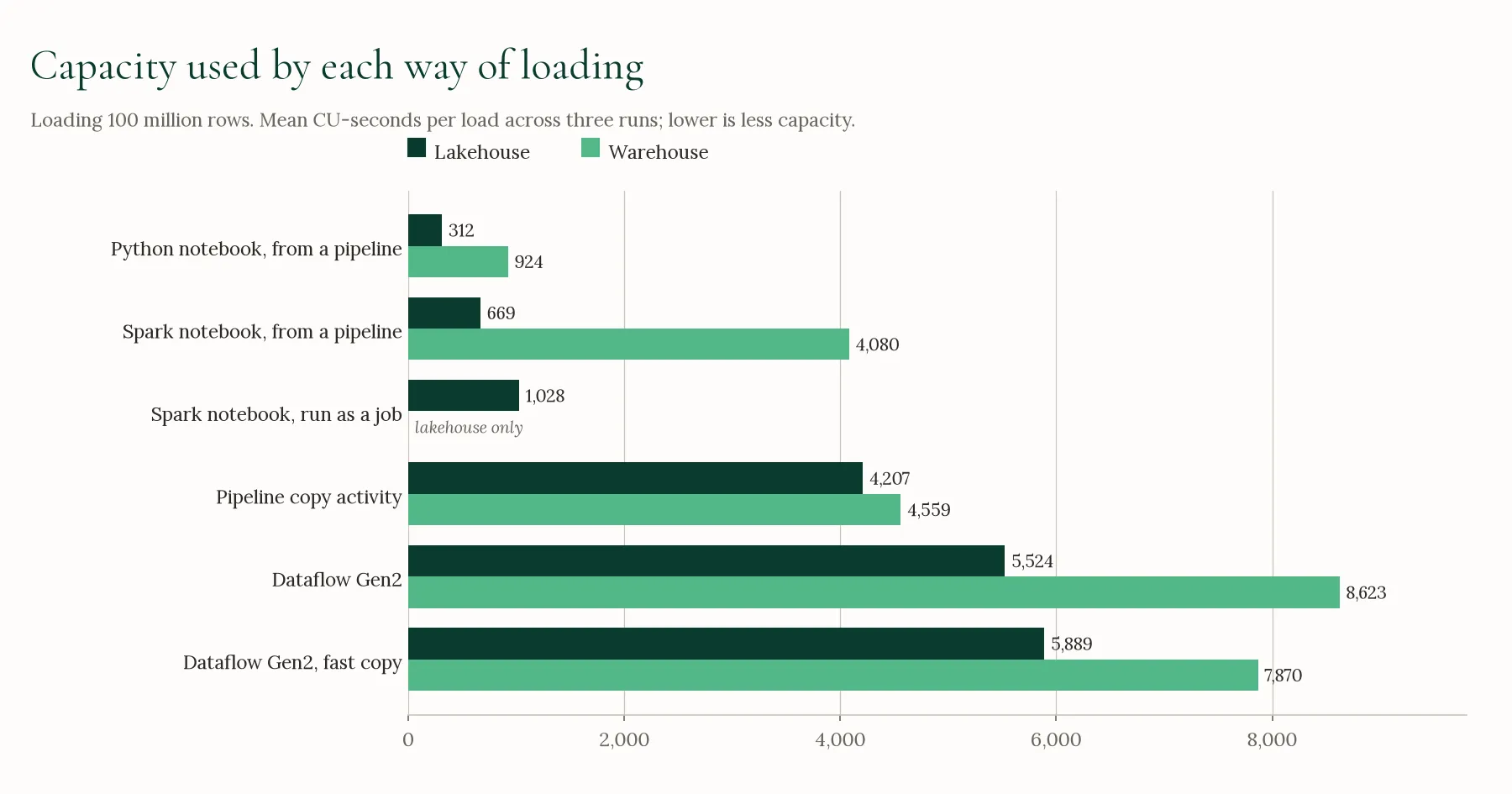
Loading 100 million rows
| Tool | Lakehouse | Warehouse | Time into the lakehouse |
|---|---|---|---|
| Python notebook, from a pipeline | 312 | 924 | 2 min |
| Spark notebook, from a pipeline | 669 | 4,080 | 1 min 40 s |
| Spark notebook, run as a job | 1,028 | — | 1 min 10 s |
| Pipeline copy activity | 4,207 | 4,559 | 10 min |
| Dataflow Gen2 | 5,524 | 8,623 | 8 min |
| Dataflow Gen2, fast copy | 5,889 | 7,870 | 8 min 30 s |
Mean CU-seconds per load, three runs each, on an F4.
The notebooks that ended their session when the work was done used the least capacity at 100 million rows, and in every run. Into the lakehouse, the Python notebook used 312 CU-seconds, less than 0.2% of an F2’s day. The Spark notebook run from a pipeline used 669 and finished in under two minutes, the fastest of the tools that run from a pipeline.
The pipeline copy activity used less than either dataflow in every 100M run, and took the longest, about 10 minutes into the lakehouse.
Turning fast copy on did not make a consistent difference to the dataflows. It used less in some runs and more in others.
Every tool used more loading into the warehouse than into the lakehouse, in every 100M run. The difference ranged from under 10% for the copy activity to about six times for the Spark notebook.
Smaller tables
| Tool | 1M, lakehouse | 10M, lakehouse | 1M, warehouse | 10M, warehouse |
|---|---|---|---|---|
| Python notebook, from a pipeline | 164 | 127 | 313 | 514 |
| Spark notebook, from a pipeline | 229 | 192 | 500 | 530 |
| Spark notebook, run as a job | 257 | 422 | — | — |
| Pipeline copy activity | 816 | 1,060 | 1,580 | 1,505 |
| Dataflow Gen2 | 384 | 924 | 564 | 1,760 |
| Dataflow Gen2, fast copy | 584 | 1,024 | 746 | 2,013 |
Mean CU-seconds per load, three runs each, on an F4.
At small sizes the order changes. At 1 million rows the pipeline copy activity used the most of any tool apart from the idle notebook, into both the lakehouse and the warehouse, in every run. A run-to-run spread of a few hundred CU-seconds is normal at these sizes, so the small differences between notebooks and dataflows here are not reliable.
A notebook left idle
| Spark notebook, 1M rows into the lakehouse | CU-seconds | Share of an F2 day |
|---|---|---|
| Session ended by a pipeline | 229 | 0.1% |
| Session ended by the job | 257 | 0.1% |
| Session left to time out after 20 minutes | 11,258 | 6.5% |
A Spark session keeps using capacity until it ends. The same 1 million row load cost about 45 times as much when the session sat for the 20 minutes an interactive session waits before it times out. The idle time was nearly all of it, so the table size barely matters. Our FabCon numbers had shown a notebook costing more on 1 million rows than on 10 million, and idle session time is the likely reason.
The SQL database
The SQL database was different from the lakehouse and warehouse in two ways.
It kept running after the load. A Fabric SQL database keeps its compute online for a while after its last activity, and that compute is billed to the capacity. On the F4, its compute ran on for 45 minutes or more after a 100 million row load.
On the F4 it locked us out. After some 100 million row loads, the database refused connections for hours (about 4 hours 20 minutes once, 4 hours 45 minutes another time) while it went on using capacity, about half of the F4 in the longer case. A 40-minute gap between database loads did not prevent it.
So we moved the database tests to an F8. On the F8 there were no lockouts in 45 loads. The database’s compute stopped 18 to 24 minutes after each load, and we left 30 minutes between database loads.
| Tool | 1M | 10M | 100M |
|---|---|---|---|
| Python notebook, from a pipeline | 3,124 | 3,665 | 8,059 |
| Pipeline copy activity | 3,516 | 4,603 | 16,854 |
| Dataflow Gen2, fast copy | 3,855 | 6,570 | 28,455 |
| Dataflow Gen2 | 3,871 | 6,121 | 29,106 |
| Spark notebook, from a pipeline | 3,336 | 5,711 | 31,500 |
Mean CU-seconds per load into a Fabric SQL database, three runs each, on an F8. Includes the database’s own compute during and after the load.
Most of each number is the database’s own compute: about 3,150 CU-seconds of the roughly 3,500 at 1 million rows, and about 16,000 at 100 million rows. That is why a 1 million row load into the database used between 4 and 19 times what the same tool used loading the lakehouse.
Reports: Direct Lake and Import
Loads are only half of the bill. We also built two semantic models on the same 100 million row lakehouse table, with the same columns and measures. One was Direct Lake, the other Import. For each model, three times, we refreshed it, waited two minutes and then ran one report page three times: six visuals (cards, a chart by date, a top 10, a year by person, a slicer and a matrix), written as the DAX queries those visuals send, with Power BI’s row limits. The two models returned the same results for every query.
| Direct Lake | Import | |
|---|---|---|
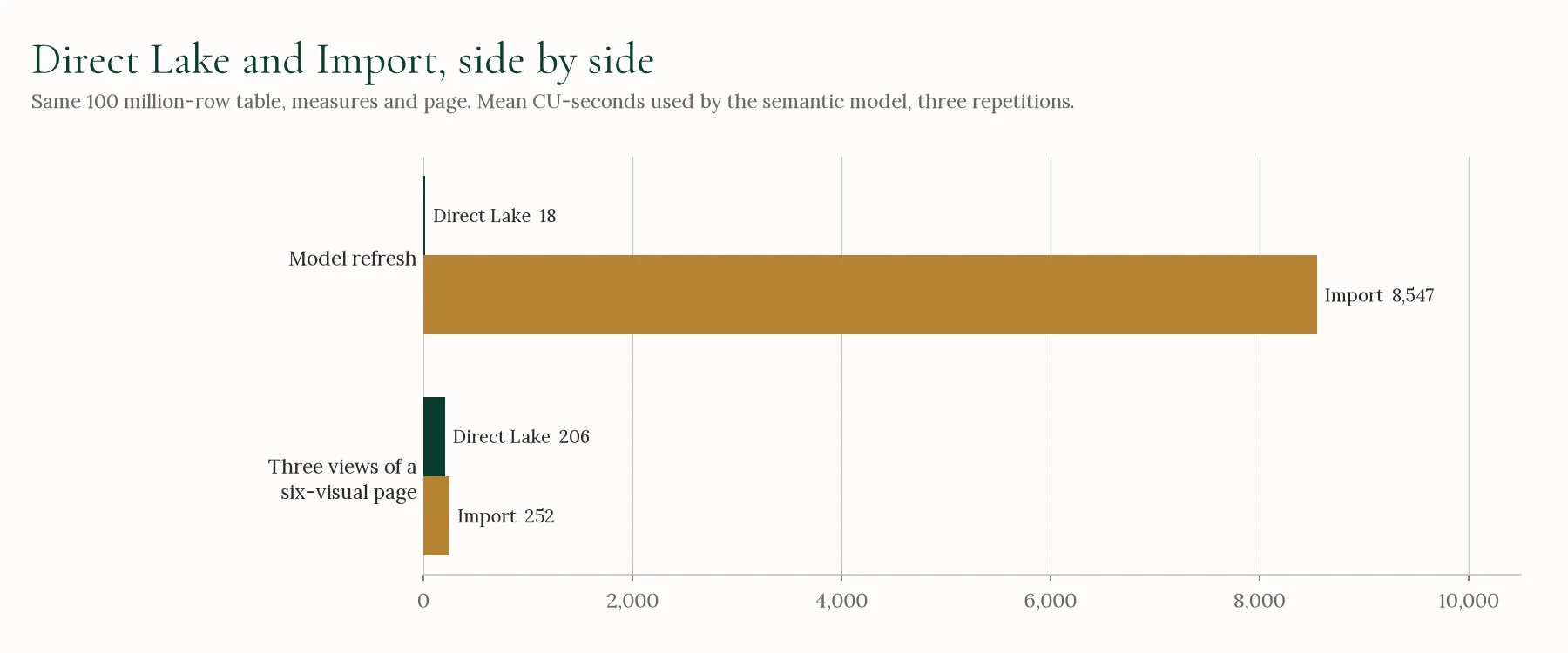
| Model refresh | 18 CU-seconds (11–29), 22 seconds | 8,547 CU-seconds (8,415–8,627), 6 minutes |
| Three views of the page | 206 CU-seconds (120–253) | 252 CU-seconds (143–370) |
Mean of three repetitions, with the lowest and highest in brackets, on an F4. The semantic model’s own usage only.
The refresh is where the models differed. An Import refresh copies all 100 million rows into the model: 8,547 CU-seconds, about 5% of an F2’s day, each time it runs. A Direct Lake refresh only points the model at the latest version of the table, which took 22 seconds and 18 CU-seconds.
Viewing the page cost about the same on either model. The ranges overlap, and the run-to-run spread was larger than the gap between them.
The lakehouse under both models also showed some usage in each cycle, from 90 to 220 CU-seconds. Most of it was a recurring SQL endpoint operation that appeared whether or not the model had used the endpoint, so we have kept it out of both models’ numbers.
This test covered one refresh and three page views per model, not a day of use. A model refreshed several times a day pays the Import refresh several times a day.
Failures
We counted every attempt, not just the ones that worked.
- Lakehouse and warehouse: all 102 loads completed and matched the source. One warehouse copy reported success and then read zero rows when we checked it straight away; its retry was correct.
- SQL database on the F8: 45 loads, and one dataflow attempt failed with “Something went wrong” after 47 seconds. Its retry succeeded. Its usage stayed with the failed attempt.
- SQL database on the F4: the lockouts above. Loads that finished in Fabric but could not be checked are not in the averages.
- Reports: every refresh and query completed. One attempt at the test was cut short when the capacity was paused from outside it, and was run again from the start.
What the numbers don’t tell you
- This is one dataset. Three narrow columns, no transformations. Wide or messy data, or a dataflow doing real work in Power Query, will behave differently.
- One region, one SKU, one point in time. Fabric changes every month.
- Starting a Spark session is in the Spark numbers. That is on purpose, because you pay for it too.
- Your workload is not ours. The Fabric trial is still the closest thing to a quote you will get. It is an F64, so divide what you see by the SKU you plan to buy.
If you are sizing a capacity and would like a second pair of eyes on the numbers, or would like the scripts to run these tests in your own tenant, that is part of our Microsoft Fabric work.