
See your Claude Code usage by client
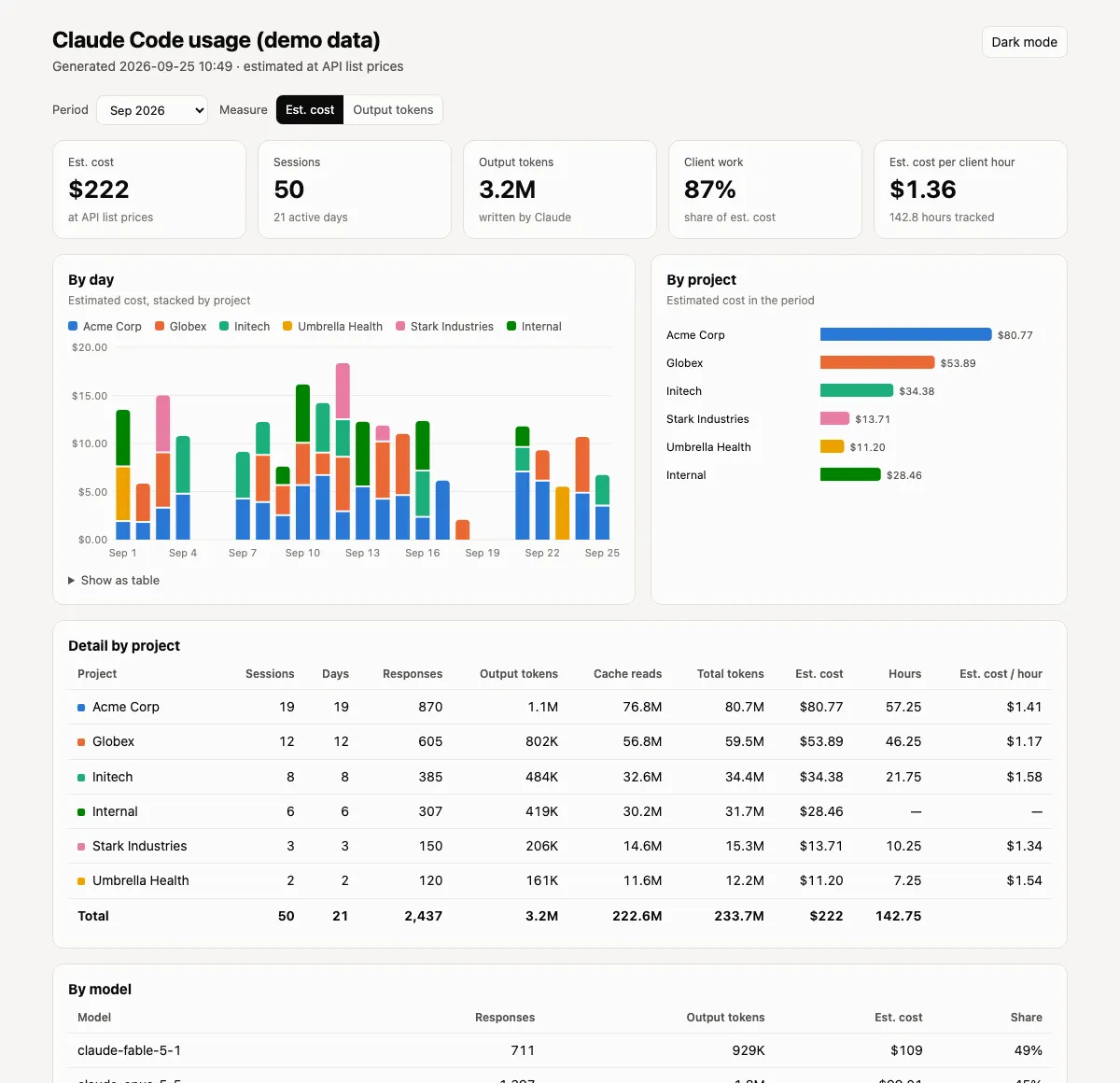
Claude Code runs on a flat subscription, which is good for the budget and bad for the questions a consultant actually asks. How much of this am I using for each client? What would it cost if I paid by the token? Does the AI effort line up with the hours I bill? The subscription dashboard answers none of that. It shows one number for one account.
The data to answer it is already on your computer. Claude Code writes a log for every session, and each entry records the folder the session ran in, the model, and the token counts. We wrote a small skill that reads those logs, groups them by client, prices them at Anthropic’s published API rates, and builds a one-page report. It takes about ten minutes to set up and runs the same on macOS and Windows. The download is at the end of this post.
What you get
A single HTML file, regenerated whenever you ask for it:
- Five tiles: estimated cost, sessions, output tokens, the share of cost that went to client work, and estimated cost per billed hour.
- Usage by day, stacked by client, with a period picker for all time, the last 30 days, or any month.
- Usage by client and by model, as a chart and as a table.
- A detail table with sessions, active days, responses, tokens, estimated cost, hours and cost per hour for every client.
- A
--publicswitch that replaces client names with Client A, B, C, so you can share a screenshot without sharing your client list.
The screenshot above is the demo report with made-up clients. Yours will look the same with your names on it.
How it works
There is nothing clever in it, which is the point.
- Claude Code keeps session logs in
~/.claude/projects(on Windows,%USERPROFILE%\.claude\projects). Every model response in those logs carries the working directory, the model name, and four token counts: input, output, cache writes and cache reads. - Each response is attributed to a client by its folder. A small
.client.jsonfile at the top of a client folder names the client, and every session started under that folder counts toward it. If you set up session titles by client from our last post, you already have this file. Folders without one can be mapped in a config file. - Each response is priced at Anthropic’s API list prices, including the cheaper rates for cache reads and the surcharge for cache writes. On a subscription you pay a flat fee, so this is what the work would cost on the API, not what you paid. It is still a fair way to compare one client with another.
- Hours are optional. Point it at Harvest, or at a CSV with date, project and hours, and the report adds hours and estimated cost per billed hour for each client.
- The report is written as one self-contained HTML file. No external scripts, nothing sent anywhere. The script itself is standard-library Python with no packages to install.
Set it up
1. Keep more history. Claude Code deletes session logs after 30 days by default. Open ~/.claude/settings.json (Windows: %USERPROFILE%\.claude\settings.json) and add:
{ "cleanupPeriodDays": 365 }This only protects logs from now on. Anything already deleted is gone, so do this first even if you set up nothing else today.
2. Install the skill. You need Python 3.9 or newer (python3 --version on macOS, py --version on Windows). Download the zip below and unzip it so the folder lands in your Claude Code skills folder:
| OS | Skills folder |
|---|---|
| macOS | ~/.claude/skills/claude-usage/ |
| Windows | %USERPROFILE%\.claude\skills\claude-usage\ |
Check that it can see your logs:
python3 ~/.claude/skills/claude-usage/scripts/claude_usage.py whereOn Windows, use py and the Windows path. The rest of the examples use the macOS form.
3. Name your client folders. Put a .client.json at the top of each one:
{ "client": "Acme Manufacturing" }That is the whole file. Add "type": "internal" to the ones that are your own business rather than a client. For any busy folder that does not fit this pattern, let the script draft a config from the last 90 days of logs and edit the result:
python3 ~/.claude/skills/claude-usage/scripts/claude_usage.py initThe config lives at ~/.config/claude-usage/config.json (Windows: %APPDATA%\claude-usage\config.json). Each entry is a name, a type, and a list of folders. The README in the download covers every option.
4. Add your hours, if you want them. In the config, set the hours source to harvest or csv. For Harvest, give it the name of an environment variable that holds your token, or a command that prints it from your password manager. Secrets never go in the config file.
5. Build the report.
python3 ~/.claude/skills/claude-usage/scripts/claude_usage.py report --openOr, since it is a skill, ask Claude Code: “show my Claude usage by client”. It runs the same script and tells you where the report is. Run it again whenever you want fresh numbers.
Reading the numbers
A few things we learned from our own report.
The token total is mostly cache reads. Claude re-reads the conversation on every turn, and most of that is served from cache at a fraction of the price. A month can show a billion tokens and a few hundred dollars. Output tokens and estimated cost describe the work better than the raw total, which is why the report leads with those.
Start sessions in the client’s folder. A session started from your home folder cannot be attributed to anyone and shows as Unassigned. The report lists the unassigned folders with the most usage so you can fix the habit or add a marker file.
It covers one computer. The logs are local, so if you work on two machines, run the report on each. It also does not see claude.ai chats or the desktop app, only Claude Code.
Prices change. The price table is a small JSON file in the skill folder. When Anthropic changes a price or ships a model, update it from their pricing page. A model without a price is listed in the report and counted as zero so nothing is silently wrong.
Sharing it safely
The report is about your clients, so treat it that way. Build the shared version with --public, which anonymizes client names and never writes folder paths into the file. Read it once before you post a screenshot. Share the method freely; keep the names.
Download
claude-usage.zip (about 50 KB). It contains the script, the report template, the price table, a README with setup and troubleshooting, an example config, a demo report, and the tests. Unzip it into your skills folder and start at step 1 above.
If you run Claude Code across several clients and want help setting up the folder structure, hooks and reporting that make this kind of thing routine, that is what our AI Starting Point session is for.